Setting Up Your Own Personal Jarvis: The Low-Cost, Simple Version
I have wanted my own Jarvis for years. Not the flying armor or omniscience—just something that remembers how I work, handles files and research, and answers from my phone without losing its place whenever I close a browser tab.
My version uses four pieces: an always-on Debian computer at home, Hermes Agent, a ChatGPT subscription, and a separate Signal account. Hermes supplies the tools and continuity; the model supplies the reasoning. It can draft a post, investigate a problem, schedule a reminder, or continue a technical project. It can also make mistakes with whatever access I give it.
What I verified: a fresh Debian VM installation, subscription login, and a successful file-write/readback task. The Signal examples come from my existing installation. The restricted-profile recipe below is documentation/source-checked, not a fresh end-to-end test. This is a practical account, not a security certification.
What it costs
A sensible starting budget is a ChatGPT subscription plus whatever your host and Signal number cost. Plus costs $20/month and includes Codex. My walkthrough used the $200/month Pro tier, not Plus. Check current plan limits and Hermes-specific eligibility before subscribing: Codex inclusion is not an unlimited API allowance.15
My bot uses an existing business-line add-on costing roughly $30/month. That puts my own recurring total around $230, excluding hardware and electricity. A $20 subscription with that same line would be around $50; I have not tested that lower-cost combination. A spare number or cheaper carrier arrangement may cost less.
No VPS is necessary if you already have a suitable computer. Signal’s Note to Self is another alternative: link your existing account rather than buy a second number. That makes the server a linked device for your personal account, so protect its credentials accordingly.3 If you use your home computer, your existing number, and Note to Self—and already have a suitable model subscription—the additional monthly cost could be $0, apart from electricity.
1. Give it a home
I would start with Debian, two CPUs, 4 GB of RAM, and 30–40 GB of disk. That’s a recommendation, not a benchmark. Use SSH keys, install updates, and keep unnecessary services off the public internet.
Run Hermes as a normal user, not root. A dedicated account without unrelated personal files is preferable to handing it your entire everyday environment. My own account has sudo and Docker access; that is convenient, but it is not strong isolation. Profiles do not change the Linux user’s underlying privileges.
2. Install Hermes and sign in
The official installer is documented by Nous Research.4 I prefer downloading it before running it:
curl -fsSL https://hermes-agent.nousresearch.com/install.sh -o install-hermes.sh
less install-hermes.sh
bash install-hermes.sh
The installer may request sudo for system dependencies. Enter passwords locally, not into an agent conversation. In our minimal Debian VM, installing build tools was one of those stops.
Reload your shell, then run:
hermes setup
Choose Full setup, then the OpenAI → ChatGPT or Codex Subscription route. Menu wording can change; you can revisit the model/provider selection with hermes model. Complete the browser/device-code authorization yourself. This route uses subscription authentication, not a separately purchased OpenAI API key.2
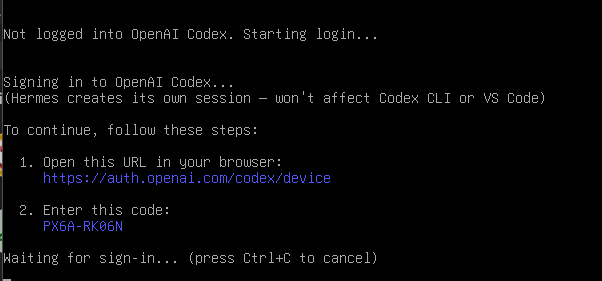
The real authorization prompt from the walkthrough. Your code will be different.
For optional speech output, my low-cost recommendation is Microsoft Edge TTS, shown in the wizard as requiring no API key. The direct OpenAI TTS option asked for a separate API key; signing in for the main model did not automatically authenticate it. Optional tools have their own requirements.
Our wizard completed despite warning that signal-cli was missing. That meant Hermes setup had finished—not that Signal was connected.
Start the CLI:
hermes
My first request was: “Create ~/jarvis-test.txt containing ‘Jarvis is workin’ baby!’ Read it back and confirm its contents.”
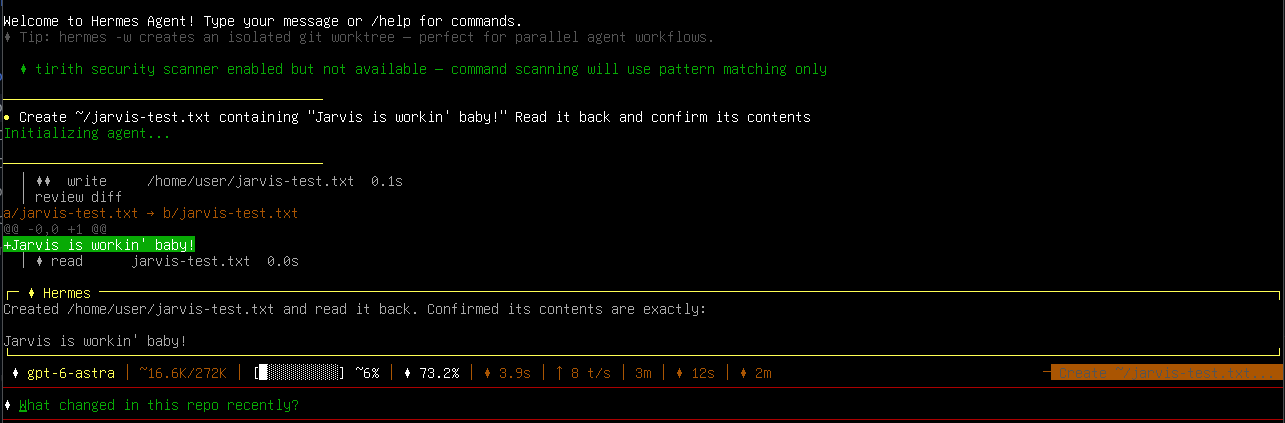
The file was also checked independently over SSH. The visible scanner warning means command scanning was using pattern matching only; this was a successful tool task, not proof that every security component was working.
If that basic task fails, fix it before adding messaging.
3. Connect Signal
I gave the bot its own Signal account because I wanted a recognizable contact I could add to topic groups. Register it on a phone first, then link the Linux host as a secondary device. You must retain access to the account’s number and primary device.3
Hermes uses signal-cli in HTTP daemon mode. Follow the current Hermes Signal guide and upstream installation requirements to install it and its required Java runtime. My installation used signal-cli 0.14.7 and Java 25; do not copy an old Java requirement without checking your chosen release.
Link from the Linux host:
signal-cli link -n "HermesAgent"
On the bot’s primary phone, open Signal → Settings → Linked Devices → Link New Device and complete linking. Protect the linking URI/QR code as a credential; don’t publish it.
Start the daemon, replacing the placeholder with the bot account’s international-format number:
signal-cli --account <BOT_E164_NUMBER> daemon --http 127.0.0.1:8080
In another terminal:
curl -fsS http://127.0.0.1:8080/api/v1/check
hermes gateway setup
Select Signal and follow the connection/access-policy prompts. Keep the daemon on 127.0.0.1, not a public interface. Protect ~/.local/share/signal-cli/: it holds linked-account credentials.3
Before allowing anyone else in, restrict direct messages to yourself and groups to an explicit list. Do not use wildcard group access. Routing and authorization are separate: sending a group to a restricted profile does not itself grant or deny membership. You can ask Hermes to configure this authorization, or edit the relevant text files yourself with nano, vim, or your editor of choice. Review the exact changes before applying them.
Once the connection works:
hermes gateway install
hermes gateway status
My existing host runs both the daemon and gateway as user services, with systemd linger enabled, and has reconnected after reboots.
4. Separate topics—and permissions
I use groups such as Bot - Blog, Bot - Home Assistant, Bot - Holiday Planning, and Bot - Gaming. Each has its own conversation history. That keeps a long house-troubleshooting session out of an editorial discussion, without requiring a new bot for every topic.8
But separate history does not mean fewer tools. Groups on the same full-power profile still expose that profile’s capabilities to authorized participants. Use another profile when the audience or permissions change.9
My family profile—called Bender here—has narrower saved tool selections and a custom MapTap leaderboard (my family loves MapTap.gg and comparing scores). Its configuration excludes terminal and local-file toolsets, among others. It also selects connector and worker-gated Kanban categories, so “nothing but web search” would overstate its restrictions.
Our first family experiment was noisy: some of my brothers immediately red-teamed the bot with fake crisis prompts. It became very concerned and was effectively voted off the island. We moved it to a dedicated family-bot chat people could mute. Keeping it silent unless deliberately invoked took more work than giving it a personality.
This custom work has been the most painful part of the project. Every time I run a Hermes update, I have my agent do careful integration so the update does not wipe out my customizations. Maybe one day I will get my changes merged into main. For now, I am very careful about updates.
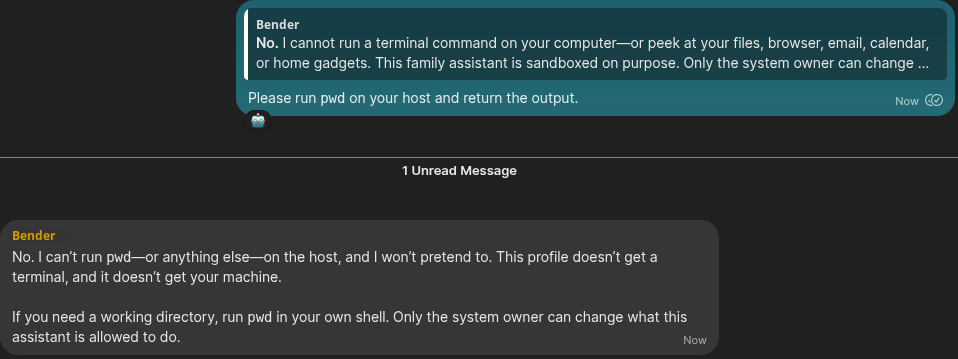
The header, avatars, and unrelated messages were cropped. This demonstrates a refusal, not an independent audit of execution or sandboxing.
Minimal restricted-group recipe
Create a blank profile, not a clone of private settings. This example selects web tools, suppresses MCP tools, and disables the built-in memory stores; it does not install my custom leaderboard.9
hermes profile create family --no-skills
hermes -p family model
hermes -p family config set platform_toolsets.signal '["web","no_mcp"]'
hermes -p family config set platform_toolsets.cli '["web","no_mcp"]'
hermes -p family config set memory.memory_enabled false
hermes -p family config set memory.user_profile_enabled false
hermes -p family tools list --platform signal
Configure credentials through the wizard. Personality belongs in the profile’s SOUL.md; instructions are not enforced tool restrictions. Check plugins separately, and remember that a profile is not an OS sandbox.
Create a disposable Signal group containing you and the bot. Find its raw ID privately through the running single-account daemon:11
curl -fsS http://127.0.0.1:8080/api/v1/rpc \
  -H 'Content-Type: application/json' \
  -d '{"jsonrpc":"2.0","method":"listGroups","id":"groups"}'
In hermes -p default config edit, merge, rather than overwrite, the route:
gateway:
  multiplex_profiles: true
  profile_routes:
    # Preserve existing routes.
    - name: family-room
      platform: signal
      chat_id: "group:<GROUP_ID>"
      profile: family
Keep the Signal adapter and authorization on the receiving/default profile; don’t start another adapter using the same account. Add the raw group ID to its SIGNAL_GROUP_ALLOWED_USERS, preserving existing entries. The route needs the group: prefix; the allowlist does not. Set the restricted route before admitting the group, because unmatched traffic can fall back to the default profile.3
config set gateway.profile_routes replaces the whole list; it is not an append command. After saving, apply with hermes -p default gateway restart and send /new in the group. Inspect the tool list and try a harmless allowed request as well as a forbidden command. A refusal alone isn’t proof of enforcement.
Start small, then stop tinkering
My advice is one working CLI task, one private Signal conversation, then one topic group. Add integrations individually. Don’t begin with your inbox, production servers, and entire house.
The useful part is not an omnipotent robot. It is a persistent assistant with enough context and access to help—and boundaries you understand. Separate topics improved mine immediately; separate profiles made sharing it more reasonable.
This account stops short of a fresh end-to-end Signal/profile test. Unauthorized-sender rejection and account-relink recovery remain untested here. Those are reasons to limit access, not to pretend the setup is useless—or safer than the evidence supports. The next article will apply the pattern to Home Assistant.
AI editing disclosure
This post was heavily AI-edited. The final editing pass used OpenAI gpt-6.1-sol through Hermes Agent. I supplied the experience, screenshots, direction, and final approval. I am recording the model so I can look back and compare how different models shape these posts.